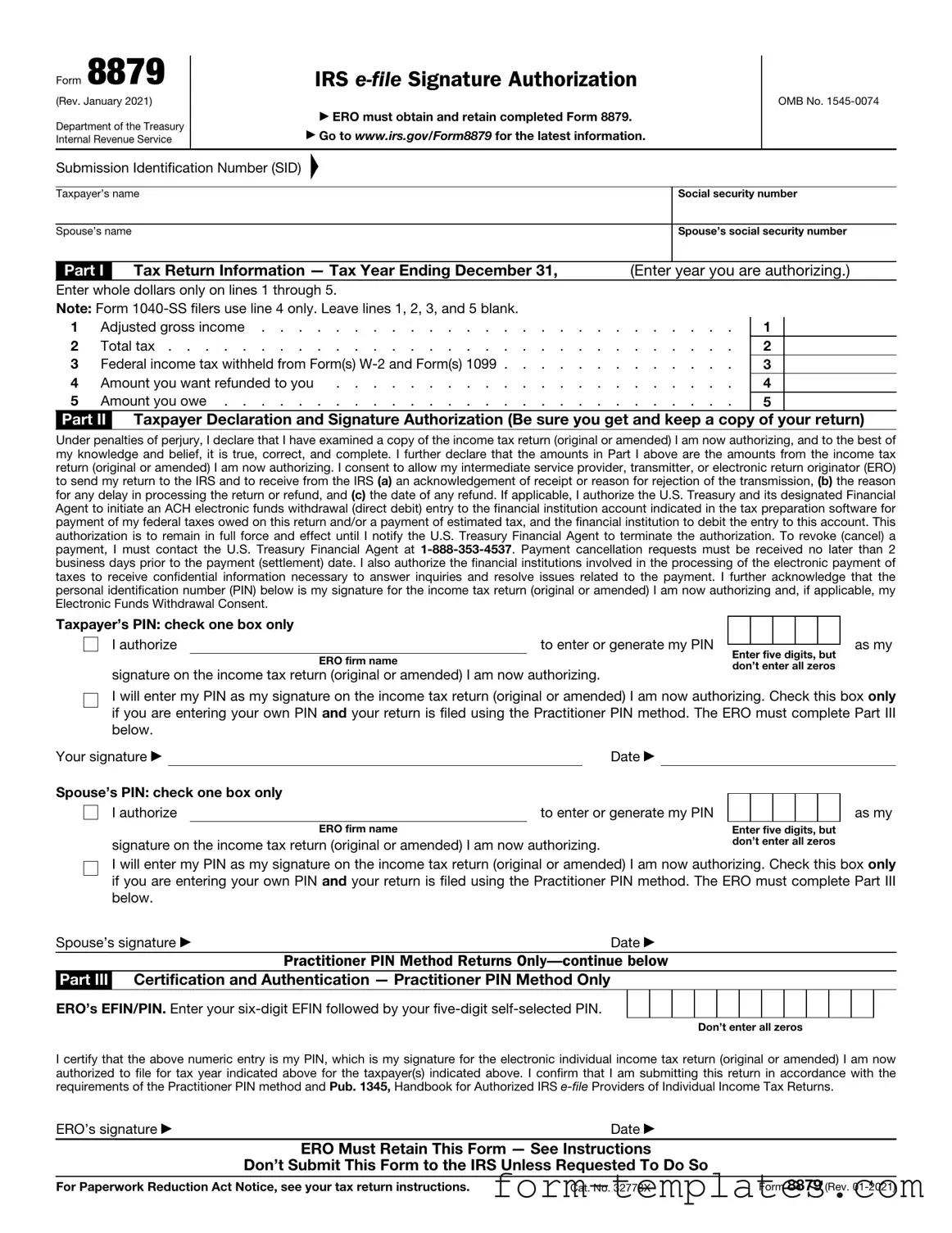
Fill Out a Valid IRS 8879 Template
Guide to Writing IRS 8879
After you have gathered all necessary information and documents for your tax return, you will need to fill out Form 8879. This form allows you to authorize your tax preparer to e-file your return. Follow these steps to complete the form accurately.
- At the top of the form, enter your name and Social Security Number (SSN). Ensure the information matches what is on your tax return.
- Fill in your spouse's name and SSN if filing jointly. If not applicable, leave this section blank.
- Provide your address, including city, state, and ZIP code. Make sure it matches your tax return.
- In the next section, enter the tax year for which you are filing.
- Review the information on your tax return and verify that it is correct. This includes your income, deductions, and credits.
- Sign and date the form in the designated areas. If filing jointly, your spouse must also sign.
- Provide your preparer's name and their Preparer Tax Identification Number (PTIN) in the appropriate fields.
- Finally, give the completed form to your tax preparer to proceed with the e-filing process.
Document Breakdown
| Fact Name | Description |
|---|---|
| Purpose | The IRS Form 8879 is used to authorize an electronic return originator (ERO) to file your tax return electronically on your behalf. |
| Signature | This form serves as your electronic signature, confirming that you have reviewed your tax return and agree with its contents. |
| Who Uses It | Taxpayers who file their returns electronically through a tax professional or ERO must complete this form. |
| Filing Deadline | The form must be signed and submitted by the tax filing deadline, which is typically April 15 for most taxpayers. |
| Retention | Taxpayers should keep a copy of the signed Form 8879 for their records, as it may be needed for future reference or audits. |
| State-Specific Forms | Some states have their own versions of the authorization form, which may be required in addition to the IRS Form 8879. |
| Governing Laws | State-specific forms and requirements vary; for example, California requires Form 8453 for electronic filing. |
| Electronic Signature | The IRS accepts electronic signatures on Form 8879, making the filing process more efficient for taxpayers. |
| Amendments | If you need to amend your tax return after submitting Form 8879, you will need to file a paper return and cannot use the ERO. |
| Security | It is crucial to ensure that your personal information on Form 8879 is protected, as it contains sensitive data. |
FAQ
What is IRS Form 8879?
IRS Form 8879 is the IRS e-file Signature Authorization form. It allows taxpayers to authorize their tax preparers to electronically file their tax returns on their behalf. This form is essential for ensuring that the e-filing process is secure and compliant with IRS regulations.
Who needs to use Form 8879?
Taxpayers who choose to e-file their tax returns through a tax preparer must use Form 8879. This includes individuals, couples filing jointly, and businesses that require electronic filing. If you are filing your return yourself, you do not need this form.
How do I complete Form 8879?
To complete Form 8879, follow these steps:
- Provide your personal information, including your name, address, and Social Security number.
- Enter the tax preparer's information, including their name and PTIN (Preparer Tax Identification Number).
- Review the information for accuracy.
- Sign and date the form to authorize e-filing.
Make sure to keep a copy for your records.
Is Form 8879 required for all e-filed returns?
Form 8879 is required only when a tax preparer is filing your return electronically. If you file your taxes manually or use tax software without a preparer, you do not need this form.
What happens if I do not submit Form 8879?
If you do not submit Form 8879, your tax preparer cannot e-file your return. This may delay your tax processing and any potential refund. It is crucial to submit this form promptly to avoid issues.
Can I revoke my authorization after signing Form 8879?
Yes, you can revoke your authorization at any time before your tax return is filed. To do this, inform your tax preparer in writing that you no longer wish to authorize them to e-file your return.
How long does Form 8879 need to be kept?
It is recommended that you keep Form 8879 for at least three years. This aligns with the IRS's guidelines for retaining tax documents. Keeping a copy helps ensure you have proof of authorization if needed later.
Can I sign Form 8879 electronically?
Yes, Form 8879 can be signed electronically if your tax preparer uses e-signature software that complies with IRS regulations. Ensure that both you and your preparer follow the necessary steps for electronic signatures.
What if I make a mistake on Form 8879?
If you make a mistake on Form 8879, you can correct it before signing. If you notice the error after signing, inform your tax preparer immediately. They can guide you on the best course of action to rectify the situation.
Where can I obtain Form 8879?
You can obtain Form 8879 from the IRS website or through your tax preparer. It is available as a downloadable PDF, which you can fill out and print. Ensure you are using the most current version of the form.
Fill out Other Forms
Roof Report Template - Assess for any water stains that might suggest leaks.
The Employee Availability form is essential for employers to gather information about their employees' preferred working hours and availability. By utilizing this form, businesses can effectively manage scheduling and fulfill their staffing requirements. For convenience, you can access the form by following this link: Employee Availability Form.
Dl 43 Form - The DL-43 is there to support drivers during significant life events.
Setting Up Direct Deposit - Ensure your paycheck lands directly in your Citibank account by completing this form.
IRS 8879 Example
Form 8879
(Rev. January 2021)
Department of the Treasury Internal Revenue Service
IRS
▶ ERO must obtain and retain completed Form 8879.
▶Go to www.irs.gov/Form8879 for the latest information.
OMB No.
Submission Identification Number (SID)
▲
Taxpayer’s name |
|
|
|
Social security number |
||||
|
|
|
|
|
|
|
||
Spouse’s name |
|
|
|
|
Spouse’s social security number |
|||
|
|
|
|
|
|
|||
Part I |
|
Tax Return Information — Tax Year Ending December 31, |
|
(Enter |
year you are authorizing.) |
|||
Enter whole dollars only on lines 1 through 5. |
|
|
|
|
|
|||
Note: Form |
|
|
|
|
|
|||
1 |
Adjusted gross income |
. |
. . |
. |
. . . |
1 |
||
2 |
Total tax |
. |
. . |
. |
. . . |
2 |
||
3 |
Federal income tax withheld from Form(s) |
. |
. . |
. |
. . . |
3 |
||
4 |
Amount you want refunded to you |
. |
. . |
. |
. . . |
4 |
||
5 |
Amount you owe |
. |
. . |
. |
. . . |
5 |
||
Part II Taxpayer Declaration and Signature Authorization (Be sure you get and keep a copy of your return)
Under penalties of perjury, I declare that I have examined a copy of the income tax return (original or amended) I am now authorizing, and to the best of my knowledge and belief, it is true, correct, and complete. I further declare that the amounts in Part I above are the amounts from the income tax return (original or amended) I am now authorizing. I consent to allow my intermediate service provider, transmitter, or electronic return originator (ERO) to send my return to the IRS and to receive from the IRS (a) an acknowledgement of receipt or reason for rejection of the transmission, (b) the reason for any delay in processing the return or refund, and (c) the date of any refund. If applicable, I authorize the U.S. Treasury and its designated Financial Agent to initiate an ACH electronic funds withdrawal (direct debit) entry to the financial institution account indicated in the tax preparation software for payment of my federal taxes owed on this return and/or a payment of estimated tax, and the financial institution to debit the entry to this account. This authorization is to remain in full force and effect until I notify the U.S. Treasury Financial Agent to terminate the authorization. To revoke (cancel) a payment, I must contact the U.S. Treasury Financial Agent at
Taxpayer’s PIN: check one box only |
|
|
|
|
|
|
|
||
I authorize |
|
|
to enter or generate my PIN |
|
|
|
|
|
|
|
Enter five digits, but |
||||||||
|
|
ERO firm name |
|||||||
|
|
don’t enter all zeros |
|||||||
signature on the income tax return (original or amended) I am now authorizing. |
|||||||||
|
|
|
|
|
|||||
as my
I will enter my PIN as my signature on the income tax return (original or amended) I am now authorizing. Check this box only if you are entering your own PIN and your return is filed using the Practitioner PIN method. The ERO must complete Part III below.
Your signature ▶ |
|
|
Date ▶ |
|
|
|
|
|
|
Spouse’s PIN: check one box only |
|
|
|
|
|
|
|
||
|
|
|
|
|
|
|
|||
I authorize |
to enter or generate my PIN |
|
|
|
|
|
|||
|
|
ERO firm name |
|
|
Enter five digits, but |
||||
signature on the income tax return (original or amended) I am now authorizing. |
don’t enter all zeros |
||||||||
as my
I will enter my PIN as my signature on the income tax return (original or amended) I am now authorizing. Check this box only if you are entering your own PIN and your return is filed using the Practitioner PIN method. The ERO must complete Part III below.
Spouse’s signature ▶ |
Date ▶ |
|
Practitioner PIN Method Returns |
Part III Certification and Authentication — Practitioner PIN Method Only
ERO’s EFIN/PIN. Enter your
Don’t enter all zeros
I certify that the above numeric entry is my PIN, which is my signature for the electronic individual income tax return (original or amended) I am now authorized to file for tax year indicated above for the taxpayer(s) indicated above. I confirm that I am submitting this return in accordance with the requirements of the Practitioner PIN method and Pub. 1345, Handbook for Authorized IRS
ERO’s signature ▶ |
Date ▶ |
|
ERO Must Retain This Form — See Instructions |
|
|
Don’t Submit This Form to the IRS Unless Requested To Do So |
|
|
For Paperwork Reduction Act Notice, see your tax return instructions. |
Cat. No. 32778X |
Form 8879 (Rev. |
Form 8879 (Rev. |
Page 2 |
General Instructions
Section references are to the Internal Revenue Code unless otherwise noted.
Future developments. For the latest information about developments related to Form 8879 and its instructions, such as legislation enacted after they were published, go to www.irs.gov/Form8879.
What's New. Form 8879 is used to authorize the electronic filing
Purpose of Form
Form 8879 is the declaration document and signature authorization for an
|
|
▲ |
|
! |
Don’t send this form to the IRS. |
The ERO must retain Form 8879. |
|
CAUTION |
|
When and How To Complete
Use this chart to determine when and how to complete Form 8879.
IF the ERO is . . . |
THEN . . . |
|
|
|
|
Not using the Practitioner |
Don’t complete |
|
PIN method and the |
Form 8879. |
|
taxpayer enters his or her |
|
|
own PIN |
|
|
|
|
|
Not using the Practitioner |
Complete Form |
|
PIN method and is |
8879, Parts I and II. |
|
authorized to enter or |
|
|
generate the taxpayer’s |
|
|
PIN |
|
|
|
|
|
Using the Practitioner PIN |
Complete Form 8879, |
|
method and is authorized |
Parts I, II, and III. |
|
to enter or generate the |
|
|
taxpayer’s PIN |
|
|
|
|
|
Using the Practitioner PIN |
Complete Form 8879, |
|
Parts I, II, and III. |
||
method and the taxpayer |
||
|
||
enters his or her own PIN |
|
|
|
|
ERO Responsibilities
The ERO must:
1.Enter the name(s) and social security number(s) of the taxpayer(s) at the top of the form.
2.Complete Part I using the amounts (zeros may be entered when appropriate) from the taxpayer’s tax return. Form
3.Enter or generate, if authorized by the taxpayer, the taxpayer’s PIN and enter it in the boxes provided in Part II.
4.Enter on the authorization line in Part II the ERO firm name (not the name of the individual preparing the return) if the ERO is authorized to enter the taxpayer’s PIN.
5.Provide the taxpayer(s) Form 8879 by hand delivery, U.S. mail, private delivery service, email, Internet website, or fax.
6.Enter the
You must receive the completed ▲! and signed Form 8879 from the
taxpayer before the electronic CAUTION return is transmitted (or released
for transmission).
For additional information, see Pub. 1345.
Taxpayer Responsibilities
Taxpayers must:
1.Verify the accuracy of the prepared income tax return, including direct deposit information.
2.Check the appropriate box in Part II to authorize the ERO to enter or generate your PIN or to do it yourself.
3.Indicate or verify your PIN when authorizing the ERO to enter or generate it (the PIN must be five digits other than all zeros).
4.Sign and date Form 8879. Taxpayers must sign Form 8879 by handwritten signature, or electronic signature if supported by computer software.
5.Return the completed Form 8879 to the ERO by hand delivery, U.S. mail, private delivery service, email, Internet website, or fax.
Your return won’t be transmitted to the IRS until the ERO receives your signed Form 8879.
Refund information. You can check on the status of your refund if it has been at least 72 hours since the IRS acknowledged receipt of your
•Go to www.irs.gov/Refunds.
•Call
•Call
Important Notes for EROs
•Don’t send Form 8879 to the IRS unless requested to do so. Retain the completed Form 8879 for 3 years from the return due date or IRS received date, whichever is later. Form 8879 may be retained electronically in accordance with the recordkeeping guidelines in Rev. Proc.
•Confirm the identity of the taxpayer(s).
•Complete Part III only if you are filing the return using the Practitioner PIN method. You aren’t required to enter the taxpayer’s date of birth, prior year adjusted gross income, or PIN in the Authentication Record of the electronically filed return.
•If you aren’t using the Practitioner PIN method, enter the taxpayer(s) date of birth and either the adjusted gross income or the PIN, or both, from the taxpayer’s prior year originally filed return in the Authentication Record of the taxpayer’s electronically filed return. Don’t use an amount from an amended return or a math error correction made by the IRS.
•Enter the taxpayer’s PIN(s) on the input screen only if the taxpayer has authorized you to do so. If married filing jointly, it is acceptable for one spouse to authorize you to enter his or her PIN, and for the other spouse to enter his or her own PIN. It isn’t acceptable for a taxpayer to select or enter the PIN of an absent spouse.
•Taxpayers must use a PIN to sign their
•Provide the taxpayer with a copy of the signed Form 8879 for his or her records upon request.
•Provide the taxpayer with a corrected copy of Form 8879 if changes are made to the return (for example, based on taxpayer review).
•EROs can sign the form using a rubber stamp, mechanical device (such as a signature pen), or computer software program. See Notice
•Go to www.irs.gov/Efile for the latest information.