Fill Out a Valid Employee Template
Guide to Writing Employee
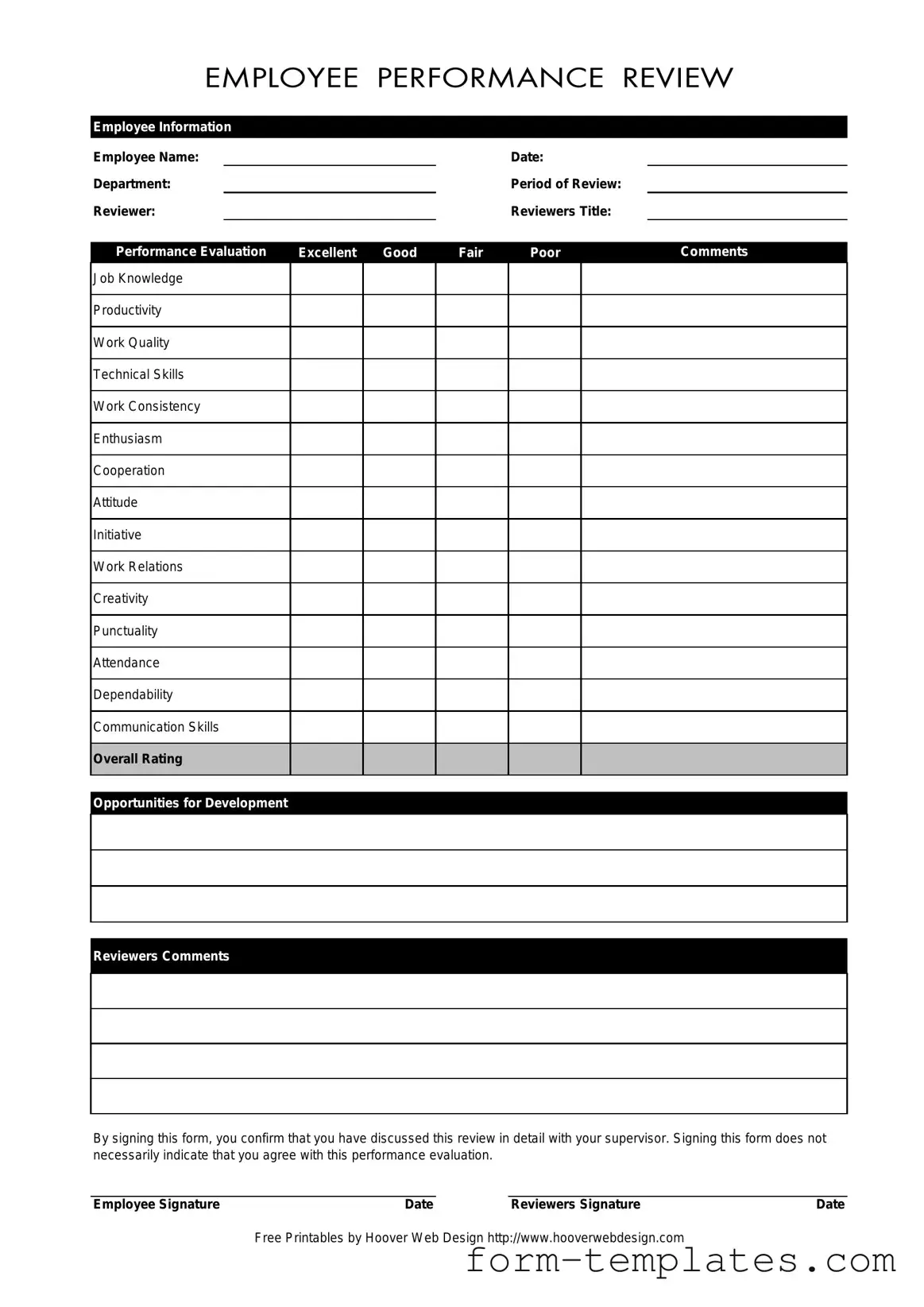
Completing the Employee form is an essential step in the performance review process. After filling out this form, it will be reviewed by your supervisor, and both parties will have an opportunity to discuss the evaluation in detail. Follow these steps to ensure you complete the form accurately.
- Enter your Employee Name in the designated field.
- Fill in the Date of the review.
- Specify your Department.
- Indicate the Period of Review.
- Provide the name of the Reviewer.
- Write the Reviewer's Title.
- Evaluate your performance by marking the appropriate rating for each category: Job Knowledge, Productivity, Work Quality, Technical Skills, Work Consistency, Enthusiasm, Cooperation, Attitude, Initiative, Work Relations, Creativity, Punctuality, Attendance, Dependability, and Communication Skills.
- Provide an Overall Rating based on your self-evaluation.
- List any Opportunities for Development you see for yourself.
- Add any additional Reviewer's Comments if applicable.
- Sign the form in the Employee Signature section and date it.
- Have the reviewer sign the form in the Reviewer's Signature section and date it.
Document Breakdown
| Fact Name | Description |
|---|---|
| Employee Information | This section collects essential details such as the employee's name, department, and the period of review. |
| Performance Evaluation Categories | Evaluations are based on various criteria including job knowledge, productivity, and work quality. |
| Rating Scale | Performance is rated as Excellent, Good, Fair, or Poor, providing clear feedback on employee performance. |
| Opportunities for Development | This section identifies areas where the employee can improve, fostering professional growth. |
| Signatures | Both the employee and the reviewer must sign the form, indicating that the review was discussed. |
| Governing Law | In many states, employee evaluations are governed by labor laws that ensure fair treatment and transparency. |
| Comments Section | Reviewers can provide additional comments, offering context and detailed feedback on the employee's performance. |
FAQ
What is the purpose of the Employee form?
The Employee form serves as a structured way to evaluate an employee's performance over a specific review period. It allows supervisors to assess various aspects of an employee's work, including job knowledge, productivity, and communication skills. By documenting these evaluations, the form helps ensure that feedback is clear and actionable, fostering professional growth and development.
What information is required on the Employee form?
The Employee form requires several key pieces of information:
- Employee Name
- Date of the evaluation
- Department where the employee works
- Period of review
- Reviewer’s name and title
Additionally, the form includes sections for performance ratings in various categories, comments from both the reviewer and the employee, and signatures to confirm that the evaluation has been discussed.
How are performance ratings determined on the form?
Performance ratings on the Employee form are typically determined through a combination of objective metrics and subjective observations. Reviewers assess the employee’s performance in categories such as job knowledge, work quality, and cooperation. Each category is rated on a scale from excellent to poor, allowing for a nuanced understanding of the employee's strengths and areas for improvement. The comments section provides an opportunity for reviewers to elaborate on their ratings, offering specific examples to support their assessments.
What should an employee do if they disagree with their performance evaluation?
If an employee disagrees with their performance evaluation, they should first discuss their concerns with their supervisor. Open communication can often resolve misunderstandings. The Employee form includes a section for comments, where the employee can express their perspective on the evaluation. It’s important to approach this conversation constructively, focusing on specific points of disagreement and seeking clarity on the reviewer’s perspective.
What does signing the Employee form signify?
By signing the Employee form, the employee acknowledges that they have discussed the performance evaluation in detail with their supervisor. However, it’s crucial to note that signing does not necessarily mean the employee agrees with the evaluation. It simply confirms that the discussion took place. This distinction is important, as it allows for a record of the evaluation process while still respecting the employee’s right to disagree.
Fill out Other Forms
Where to Fax Form 433-d - A clear presentation of finances on IRS 433-F can expedite IRS decisions.
Having a clear understanding of the Room Rental Agreement is crucial for both landlords and tenants, as it sets forth the expectations and obligations that govern their relationship. This document is vital for reducing misunderstandings, and you can find a comprehensive Room Rental Agreement that details the essential elements to consider, from rent amounts to maintenance responsibilities.
Puppy Health Record - Parasite control measures inform health management.
Army Retirement Points - This form details the duties, training, and instruction completed by soldiers during their service.
Employee Example
Employee Information
Employee Name: |
|
|
|
|
Date: |
|
Department: |
|
|
|
|
Period of Review: |
|
Reviewer: |
|
|
|
Reviewers Title: |
|
|
|
|
|
|
|
|
|
Performance Evaluation |
Excellent |
Good |
Fair |
Poor |
Comments |
|
|
|
|
|
|
|
|
Job Knowledge
Productivity
Work Quality
Technical Skills
Work Consistency
Enthusiasm
Cooperation
Attitude
Initiative
Work Relations
Creativity
Punctuality
Attendance
Dependability
Communication Skills
Overall Rating
Opportunities for Development
Reviewers Comments
By signing this form, you confirm that you have discussed this review in detail with your supervisor. Signing this form does not necessarily indicate that you agree with this performance evaluation.
Employee Signature |
Date |
Reviewers Signature |
Date |
Free Printables by Hoover Web Design http://www.hooverwebdesign.com